
Remix Desktop
The Desktop version of Remix IDE and how I use it with Foundry

I was introduced to Web3 development some years ago at a workshop in Nairobi, and the first thing we were instructed to do was to open up Remix. I remember I was greeted by its very beautiful UI. In the following months, I dove deeper into blockchain development and became a Smart Contract developer, and I’m still using Remix.
Recently I came across Remix Desktop. It’s very similar to Remix Online IDE but it’s a downloadable application. What caught my interest was its ability to build contracts without needing the internet. And beyond that, Remix Desktop includes a panel that accesses your computer’s native terminal, you can use many different types of wallets for deploying, and most importantly, you can use Foundry in Remix.
The Features of Remix Desktop
Remix Desktop is a version of Remix IDE that runs directly on your machine. Unlike the browser IDE, which requires internet access, Remix Desktop gives you:
Offline capability
Faster performance thanks to local system resources
Local storage for your contracts
A smooth environment for writing Solidity, Noir, Circom, and other smart contract languages
A reliable setup for developers who work in areas with slow or unstable connections
Native terminals on the go (bash, zsh, powershell , cmd.exe etc.)
Multiple instances of Remix running at the same time
Ability to work on your files in other editors at the same time (e.g. neovim, vim, vscode, cursor etc.)
Remix Desktop is a wrapper of Remix IDE so Remix Desktop will automatically update to the latest version of Remix IDE whenever its published
With Remix Desktop, you can code anytime and anywhere, no browser, no lag, and no internet required for basic work.
Practical Use Cases for Remix Desktop
Easy offline development
Working in restricted networks (schools, offices)
Using Remix + Foundry in one place
Coding and saving work to your hard drive
Teaching or workshop environments without stable Wi-Fi
Running Remix Desktop Offline
To use Remix Desktop offline, first download the compilers you want in the Solidity Compiler plugin.

Then you can compile and deploy to the local Remix VM-simulated chain or to Anvil or the HardHat local test chains.
You can see your internet connection status here:
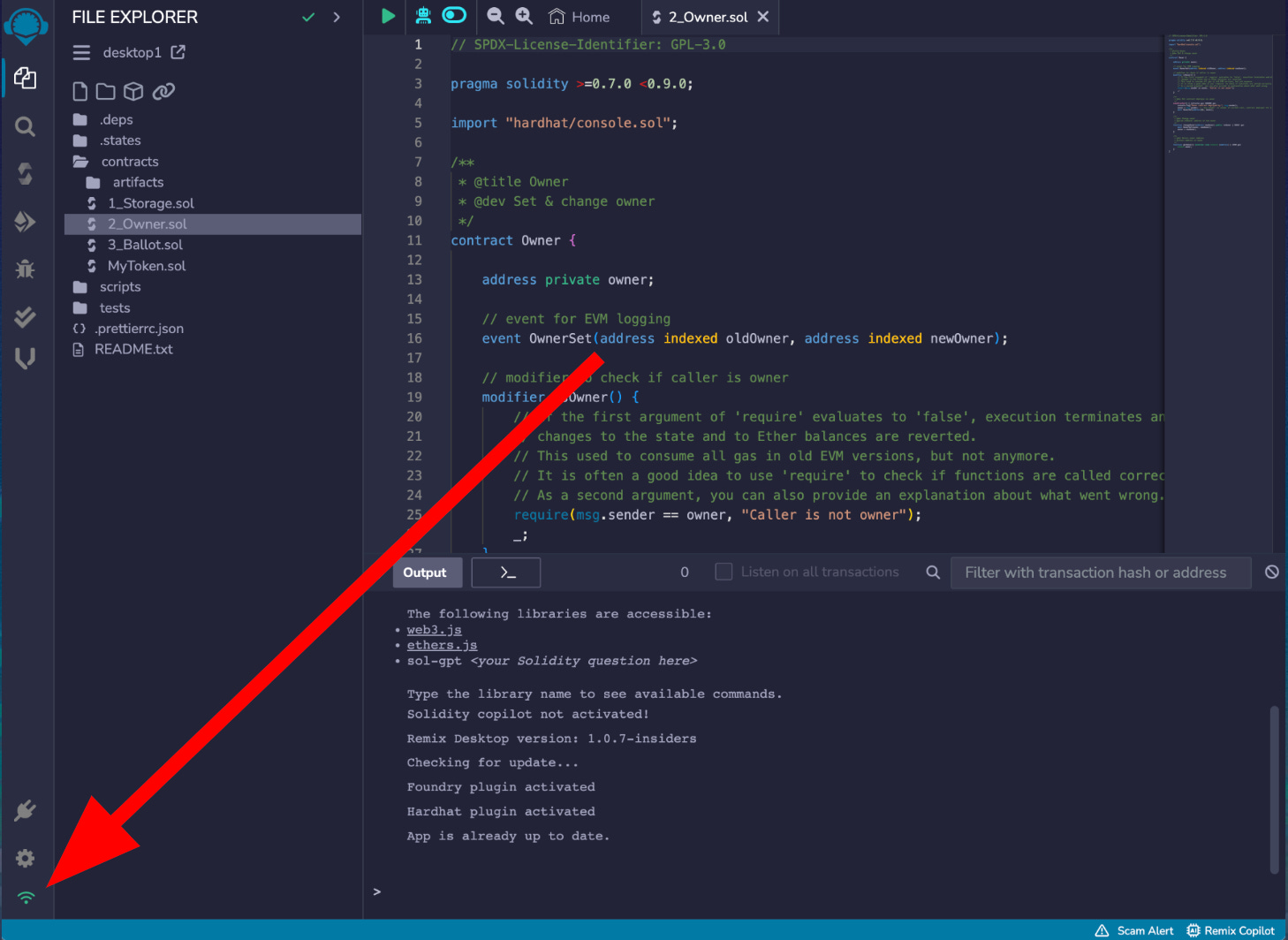
Green = online
Red = offline
Native Terminal
As someone who loves the command line, the native terminal is one of the most compelling features of Remix Desktop that I use most of the time, if not all the time. It’s not just a simple add-on, it’s a fully integrated gateway to your machine’s shell, bringing the power of your entire development environment directly into the IDE.
Examples of How I Use the Remix Terminal
Seamless Git Operations:
Forget switching windows to manage your code. You can directly clone new or existing repositories, commit changes, and push your code to GitHub, all without leaving Remix.
Supercharging Foundry & Other Tools:
As I prefer Foundry for building my projects, the terminal lets you run any Foundry command that isn’t natively supported in Remix. For example, you can execute advanced Fuzz tests (forge test --match-test testFuzz), run Forge scripts for complex deployments, or use Cast to craft specific RPC calls directly from the Remix terminal in the same workspace.
Beyond Smart Contracts:
Remix Desktop also supports Typescript and Javascript. You can install dependencies, perform npm scripts (e.g. npm run dev etc.), or manage Docker containers via the terminal, all while keeping your code in the same window.
Using NeoVim and VSCode with Remix Desktop
Sometimes I don’t want to write code in the Remix editor. I prefer using the same editors I use for my other projects NeoVim or VSCode. The beauty of Remix Desktop is that I can do exactly that without compromising or vendor-blocking.
I just open my project folder in NeoVim or VSCode and start coding there. At the same time, I have Remix Desktop open on the same folder with Auto-Compile enabled. As I save changes in my editor, Remix automatically picks them up and recompiles. Then I switch to Remix Desktop just for deploying, testing, or using the debugger, or I use some other plugin like Solidity Analyzer (one of my favorite plugins which helps me to deeply analyse my contracts).
This workflow lets me stay in my comfort zone with my preferred editor setup (my LSP configurations, keybindings, themes, extensions) while still having access to Remix’s powerful deployment and debugging features. I get the best of both worlds without compromising on either side.
Using Remix Desktop with a Foundry Project
I’ve integrated Foundry into my Remix Desktop workflow, and it’s been incredibly powerful. Remix handles the visual side of things, and I use Foundry for what it does best : testing and advanced operations.
Remix can see when I compile in Foundry
When I compile a contract in Foundry, Remix Desktop automatically picks up the compilation artifacts from the out/ folder.

This means I can leverage Foundry’s compilation speed and testing framework while still using Remix’s deployment interface and debugger when I need them. It’s a great hybrid setup.
Remix + Foundry Workflow
Here’s how I use them together:
Property-Based Testing with Fuzzing
I typically run my fuzz tests with Foundry using forge test --match-test testFuzz in the terminal. The fuzzing capabilities in Foundry are unmatched, and being able to run them directly from Remix Desktop while viewing my contracts is seamless. I also use Foundry for gas optimization reports with forge test --gas-report, which helps me identify expensive operations quickly.
Remix doesn’t have built-in fuzzing capabilities. When I need to test edge cases or ensure my contract handles unexpected inputs, I switch to Foundry:
# Run fuzz tests with thousands of random inputs
forge test --match-test testFuzz -vvv
I write the fuzz tests in Remix, run them in the terminal, and if something breaks, I use Remix’s debugger to step through the exact transaction that failed.
The combination is incredibly powerful for catching bugs.
Gas Profiling and Snapshots
Remix shows you gas costs for individual transactions, but Foundry gives you the full picture:
# See gas costs across all functions

forge test --gas-report

# Create baseline to track optimization efforts

forge snapshot
I use this to compare gas costs before and after refactoring.
Remix is where I write the code
Foundry is where I verify that it’s actually more efficient
Testing Against Forked Mainnet
Remix can fork Mainnet or any other EVM chain in the Deploy & Run plugin:
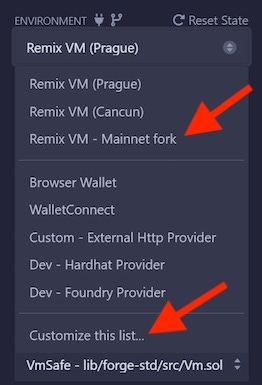
If you don’t see the Remix VM Mainnet or Remix VM Custom Fork options, you’ll need to select the Customize this link which will open a tab of options in Remix’s Main Panel.

Nevertheless, I usually use Foundry for forking when I need to test how my contract interacts with existing Mainnet contracts (like Uniswap or Aave), and I run this command in the terminal:
# Fork mainnet at specific block
forge test --fork-url $MAINNET_RPC --fork-block-number 18000000
I test my contract against real protocol state without deploying anything. Then I use Remix to refine the contract and redeploy to my local Anvil instance.
Advanced On-Chain Queries with Cast
I use the Foundry cast command for its thorough reading of blockchain data.
# Get storage slot data
cast storage 0xAddress 0

# Decode transaction input

cast 4byte-decode 0xa9059cbb...

# Simulate a transaction before sending

cast call 0xContract “function()” --from 0xAddress
And I often use Cast to investigate how other contracts work, then implement similar patterns in Remix.
Continuous Testing Workflow
My typical workflow is:
I write contracts in Remix (or NeoVim with Remix open)
Save the file which triggers Foundry’s watch mode to automatically run my test suite:
forge test --watchEvery save triggers the tests. If they pass, I know my changes are safe. If they fail, I switch to Remix’s debugger to investigate. Foundry provides the automated testing workflow that Remix lacks, while Remix provides the visual debugging tools Foundry doesn’t have.
Deploying with Remix Desktop Using a Browser Wallet or Foundry
MetaMask through Remix is perfect for the development cycle :quick, visual, and immediate. Foundry scripts are for when you need precision, repeatability, and handling complex deployment logic. Having both in Remix Desktop means I can choose the right tool for the job without leaving my environment.
I use:
Remix with Metamask for basic deployments; it’s quick, visual, and immediate.
Foundry scripts run from a terminal in Remix for complex deployments that are repeated, that handle complex logic, or that go to multiple networks.
Basic Deployments with a Browser Wallet in Remix Desktop
Its surprising but true; you can use a browser wallet in Remix Desktop.
In Deploy and Run, choose Injected Provider in the Environment select box, a browser will open on a local URL (like http://localhost:49589/). With this browser, your browser wallet is accessible.
I use this method when:
Deploying a single contract to a testnet
Testing contract functions quickly
Doing iterative development where I need immediate feedback
Advanced Deployments with Foundry Scripts
For production deployments or anything more complex, I switch to Foundry scripts. I can execute Forge script commands right from the Remix terminal to handle complex multi-contract deployments with precise control. And when I need to interact with previously deployed contracts or check on-chain data, I use cast commands like cast call or cast send without leaving my workspace. An example would be deploying a multi-contract system like a token with a vesting contract and an airdrop contract. With MetaMask, I’d have to deploy each contract manually, copy addresses, and pass them to the next contract. It’s tedious and error-prone.
Instead, I write a Foundry deployment script in Remix IDE:
// SPDX-License-Identifier: MIT
pragma solidity 0.8.30;

import "forge-std/Script.sol";
import "../src/MyToken.sol";
import "../src/VestingContract.sol";
import "../src/Airdrop.sol";

contract DeployScript is Script {
    function run() external {
        uint256 deployerPrivateKey = vm.envUint("PRIVATE_KEY");

        vm.startBroadcast(deployerPrivateKey);

        // Deploy token
        MyToken token = new MyToken("MyToken", "MTK", 1000000e18);

        // Deploy vesting with token address
        VestingContract vesting = new VestingContract(address(token));

        // Deploy airdrop with both addresses
        Airdrop airdrop = new Airdrop(address(token), address(vesting));

        // Initialize contracts
        token.grantRole(MINTER_ROLE, address(airdrop));
        vesting.setAirdropContract(address(airdrop));

        vm.stopBroadcast();

        console.log("Token deployed at:", address(token));
        console.log("Vesting deployed at:", address(vesting));
        console.log("Airdrop deployed at:", address(airdrop));
    }
}
Then, I run it from the Remix Desktop terminal with my RPC provider:
forge script script/Deploy.s.sol --rpc-url $SCROLL_RPC_URL --account burner --broadcast --verifyThis deploys all three contracts, sets up their relationships, and even verifies them on Etherscan, all in one command. If something fails midway, Foundry’s resume feature lets me continue from where it stopped without redeploying everything.
I also use Foundry scripts for:
Deployment with constructor arguments from external files: Reading configurations from JSON
Conditional deployments: Checking if a contract already exists before deploying
Post-deployment setup: Transferring ownership, setting up access control, funding contracts
Multi-chain deployments: Using the same script across different networks with different RPC URLs
Remix Desktop has completely changed how I approach smart contract development
Remix Desktop is a development environment that adapts to how you already work.
The ability to code in my preferred editors like NeoVim or VSCode while Remix handles compilation and deployment means I never have to compromise. The native terminal brings the full power of my machine into the IDE, letting me run Git operations, manage dependencies, and execute Foundry commands without switching contexts or windows.
Speaking of Foundry, the integration is where things really shine. Remix provides the visual tools and intuitive deployment interface, while Foundry fills the gaps with advanced fuzzing, Mainnet forking, gas profiling, and continuous testing workflows. They complement each other perfectly.
Whether you’re working offline on a flight to a hackathon, dealing with unstable internet, or just want the flexibility to use your own tools without losing access to Remix’s powerful features, Remix Desktop delivers. It’s the development setup I wish I had when I first started writing smart contracts.
Remix Community URLs
For extra support and community guidance, join the Remix community channel:
Official website about the Remix Project : https://remix.live/
Official documentation: https://remix-ide.readthedocs.io/en/latest/
Github: https://github.com/ethereum/remix-project
Discord: https://discord.gg/7RvvZ4KX9P
Substack: https://ethereumremix.substack.com
 | A guest post by
|